Overview
Graphnosis gives any AI a persistent, private memory — without a cloud service, an account, or sending your data anywhere.
Graphnosis is your local encrypted memory, indexed for deterministic recall — auditable
Here is the problem with how AI “memory” has worked until now.
When people want an AI to know something, they paste files into the chat window, attach documents, or use retrieval tools that dump raw text into the AI’s context. The AI reads the document fresh — every single time, for every conversation. It is the cognitive equivalent of handing someone a textbook and asking them to read it before every question, then closing it and forgetting everything afterward.
The human brain doesn’t work this way. The brain has a division of labor:
- The hippocampus converts raw experience into compact, indexed memory traces — engrams. It handles encoding (turning new information into memory), storage (maintaining those memory traces over time), and retrieval (surfacing the right memory when the brain needs it).
- The prefrontal cortex handles reasoning, planning, and language. When it needs to draw on something you’ve learned, it doesn’t re-read the original source — the hippocampus retrieves the relevant engram and delivers it as context.
- The cortex (more precisely, the neocortex) is the long-term store — the vast, distributed archive of everything you know.
AI has always had the prefrontal cortex (the reasoning layer) but never a hippocampus. It reasons brilliantly, then forgets everything the moment the context window closes. It has no long-term store it can draw on selectively — and certainly never one like Graphnosis: local, encrypted, and private, recalling deterministically (the same query returns the same memories every time), and holding knowledge as a federated multi-graph rather than a flat pile of text.
Graphnosis is that hippocampus — the one AI never had.
Why the seahorse?
The Graphnosis logo is a seahorse — and that’s not just decoration.
The word hippocampus comes from the ancient Greek hippókampos (ἱππόκαμπος), literally “horse-monster of the sea” — a seahorse. The anatomist Julius Caesar Aranzi, dissecting a human brain in 1564, looked at the small curled structure deep in the medial temporal lobe and thought: that looks like a seahorse. The name stuck. Five centuries later, every neuroscience textbook still calls it the hippocampus.
So the brand stack lines up like this:
- The seahorse (logo) → reminds you of the hippocampus (anatomy) → which is the brain region for encoding and retrieving memory (function) → which Graphnosis embodies as the sidecar / synapse + engram graph + .gai files (software).
When you see the seahorse, think: this is the part of the AI stack that remembers for me.
How Graphnosis maps to the brain
| Brain structure | Graphnosis equivalent | What it does |
|---|---|---|
| Neocortex (long-term store) | Your cortex folder | Encrypted archive of all your knowledge — the .gai engram files |
| Engrams (memory traces) | Knowledge graph nodes | Compact, semantically indexed representations of what you’ve ingested |
| Hippocampus (encode + retrieve) | Graphnosis sidecar | Encodes raw content into engrams on ingest; retrieves relevant ones on recall |
| Synapse (signal pathway) | Graphnosis synapse (the local background process) | The bridge between your AI client and your cortex; only fires when the app is running and the cortex is unlocked |
| Prefrontal cortex (reasoning) | Your AI client | Receives only the retrieved engrams it needs; reasons from there |
Graphnosis borrows that division of labor — then inverts the constraints that make biological memory lossy. We call the result the un-brain:
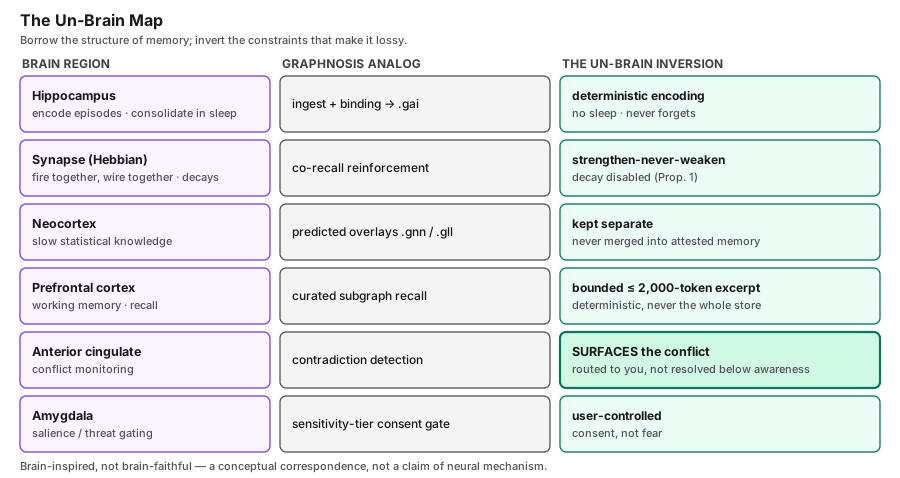
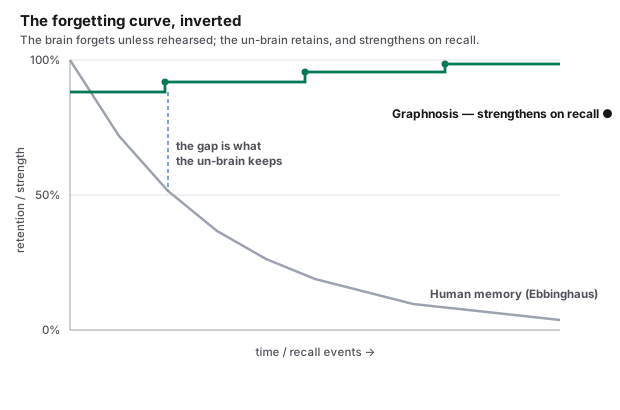
Two inversions matter most. The brain’s memory decays — the Ebbinghaus forgetting curve — while an attested Graphnosis memory is retained, and strengthened when you recall it:
And when the brain holds two conflicting memories, it reconciles them below awareness and hands you one confident answer that may be false. Graphnosis surfaces the conflict and lets you decide — it never resolves one on your behalf:
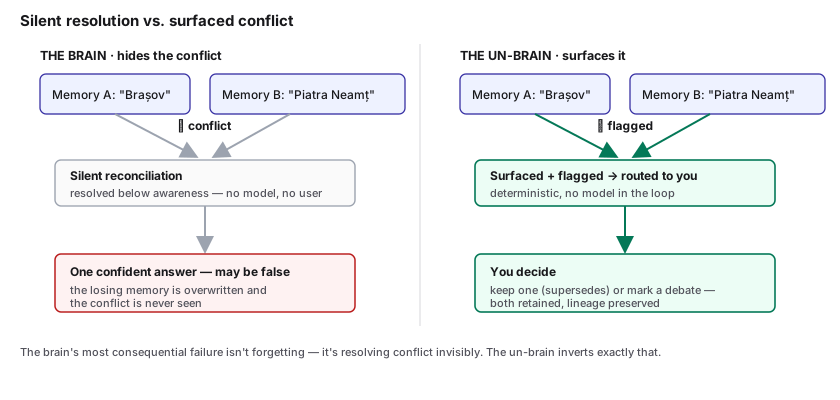
The formal treatment — the theorems, proofs, and the LongMemEval evaluation behind these claims — is in the research paper: The Un-Brain (whitepaper).
The synapse is what we call Graphnosis’ local sidecar process — the small program that runs in the background whenever the app is open. In the brain, a synapse is the active connection that passes a signal from one neuron to the next; in Graphnosis it is the active connection that passes a recall query from your AI client into the cortex and the matched engrams back out. When the synapse is offline (app closed, cortex locked, or sidecar crashed), no memory flows. The app’s error messages refer to it by name — e.g. “Another Graphnosis synapse is already holding this cortex’s lock” — so it helps to recognize the term.
When you ingest a PDF or document, Graphnosis doesn’t hand the raw file to your AI — that’s the old, expensive approach. It encodes the document into engrams: semantically compressed, binary-encrypted memory traces stored in the cortex. The original file stays on your disk, untouched.
When you ask your AI a question, the hippocampus does its job: it searches the engram graph, finds the memory traces most relevant to what you’re asking right now, and delivers a small, precise context block. Your AI reasons with current, targeted memory — not a stale document dump.
This is why Graphnosis responses feel different from naive retrieval-augmented generation. The AI isn’t reading your whole document every time. It is remembering.
The core idea
Most AI assistants are stateless by default. They don’t remember what you told them last week, which documents you’ve been working with, or the decisions you’ve made. You end up re-explaining context in every conversation.
Graphnosis solves this by sitting alongside your AI client as an MCP server. When a conversation starts, it quietly retrieves only the most semantically relevant engrams from your personal cortex and surfaces them as context. Your AI responds as if it already knows the background.
Your data never leaves your device unless you are actively using an AI client. Even then, Graphnosis sends only the small handful of memory nodes relevant to your specific question — not your full cortex, not the original files, not anything unrelated to what you’re asking at that moment. If you close the AI client or don’t ask anything, nothing moves.
Everything stays on your machine. No Nehloo servers are ever contacted.
Key concepts
Cortex
A cortex is an encrypted local folder — named after the neocortex, the brain’s long-term memory store. It holds your engram graph (the .gai binary files), embedding cache, op-log, and policy configuration — all encrypted at rest with libsodium xchacha20poly1305. The encryption key is derived from your passphrase using Argon2id.
You choose where the folder lives. You can have multiple cortexes — for work, personal life, specific projects. Each is completely independent.
Engram graph
Inside the cortex, memories are stored as an engram graph — a knowledge graph where each node is a semantically indexed memory trace derived from something you’ve ingested. Nodes are binary-encoded (.gai format), not human-readable plain text.
The files the app writes to disk are not plain .gai — they are encrypted with a GNAPP\x01 envelope (xchacha20poly1305, Argon2id key derived from your passphrase) before being stored. This means:
- Your AI cannot read your cortex directly, even if it somehow had access to the files. The engrams are only surfaced through Graphnosis’ retrieval layer.
- No tool can read your cortex without your passphrase. The encryption does not depend on the libraries being secret —
@nehloo/graphnosisis open source under Apache-2.0, and@nehloo-interactive/graphnosis-secure-syncis source-available under FSL-1.1. Auditable crypto is stronger crypto. - Power users can access their own data programmatically. With both libraries and your passphrase, you can decrypt and parse your cortex outside the app — for exports, custom tooling, or migration. This is intentional. Your data is not locked in.
The cortex is also intentionally portable: the encryption salt is embedded in each file, not tied to the machine it was created on. Copy the folder to another machine, unlock it with your passphrase — it just works. The passphrase is the key, not the device. Treat it accordingly.
Graphs
Inside a cortex you can have multiple graphs — named subsets of the engram graph, each with its own sensitivity tier and token budget. Think of graphs as separate topics: work, health, research. When the AI calls recall, each graph’s tier determines whether and how much of it can be surfaced.
How memories connect
A memory is only as useful as what it is connected to. Graphnosis links memories on three layers:
-
Within an engram — a dual-graph of undirected and directed edges. An engram (
.gaifile) is not a flat list of nodes; it is a graph with two kinds of connection. Undirected edges are associative — “these two memories are about the same thing” — symmetric, with no direction. Directed, typed edges carry both direction and meaning —causes,contains,supersedes,depends-on. Together they let recall do more than keyword matching: it can follow how your memories relate, not just that they relate. Both kinds are deterministic and live inside the encrypted.gaifile. -
Across engrams — multi-graph federation. Your engrams are separated by topic, but they are not islands. Every
recallis federated: it searches all accessible engrams at once and returns the best memories wherever they live. The background passes also weave cross-engram connections — links between related memories in different engrams — so a question grounded in yourworkengram can surface what you know inresearch. Federation is deterministic; the cross-engram links are stored encrypted alongside your cortex. -
An optional third layer — the Neural Network overlay. If you choose to enable it, the Graphnosis Neural Network adds a third set of connections: edges it predicts are likely real but not yet recorded. These are deliberately kept out of the deterministic
.gaigraph — they live in a separateneural-network.gnnoverlay, are always clearly labeled, and can be discarded in one click. Layers 1 and 2 are deterministic and always on; layer 3 is non-deterministic and entirely opt-in.
Sources and chunks
When you ingest a file or URL, Graphnosis creates a Source record and splits the content into chunks. Each chunk is embedded (converted to a vector) locally using a BGE-small-en-v1.5 model running entirely on your device. The embedding is what enables semantic recall — finding relevant memories even when you don’t remember the exact words you used.
Ghampus room — topics, not chat clutter
Inside the Graphnosis app, Ghampus Hush is your confidential AI orchestrator in a single chat room. Specialist agents (Agempi) wear Digital Hats and join when you @ them. Day-to-day work grows as Topics (living lanes); Chat Sessions keep recoverable history when you clear a thread. In-chat Remember, Quote, and 1:1 Focus stay in that same window. See Ghampus chat — topics, hats & one room.
Autonomous Skills — procedural memory as SOPs
Graphnosis ships a dedicated Skills engram for procedural memory: Standard Operating Procedures you author and compile into structured SOPs (the Autonomous Skills product layer). Compile uses your source text only; personal memory applies at walk/runtime via recall, not baked in at train time. Skills are callable by any MCP client. A skill is a sequence of body steps wired by five edge types (linear, loops, branches, supporting context, and cross-skill calls), with eight goal categories per skill (Success, Out of scope, On completion, Trigger, Prerequisites, On failure, Requires, Produces). The AI executes a skill by calling walk_skill_structured, which returns a SkillExecutionPlan JSON: required inputs, ordered steps, sub-skill calls with args + return captures, and failure handlers. Three signed .gsk demo packs auto-load on first unlock so there is something to try immediately. See Autonomous Skills.
Recall via MCP
When you open a conversation in your AI client, Graphnosis is running as an MCP server in the background. The AI client calls the recall tool with the current conversation topic. Graphnosis performs a semantic search across your engram graph, selects the top-k most relevant nodes (subject to tier limits and token caps), and returns them as a compact, plain-text context block.
This is the only moment when any memory content leaves your device — and it travels only to the AI provider you are actively using, for the conversation you are actively having. It does not go to Nehloo Interactive. It does not go anywhere else. See Using Graphnosis with AI Clients for a full breakdown.
For this to work, the Graphnosis app must be running and your cortex must be unlocked. If the app is closed or the cortex is locked, your AI client falls back to behaving as if Graphnosis isn’t there.
Why pre-indexing makes AI clients more precise
Without Graphnosis, when you ask your AI to “summarize the budget spreadsheet I shared last week” or “find the section in that 200-page PDF about Q4,” the client has to parse the file again — every prompt, every session. That’s slow, expensive in tokens, and prone to inconsistency (different runs produce different summaries from the same file).
With Graphnosis:
- Each file is parsed once at ingest time and stored as structured engrams in
.gaigraphs. - At conversation time, the AI receives the few hundred tokens that actually match the prompt, not the entire file.
- Answers stay consistent across sessions because the same indexed memory is recalled the same way every time.
- Different sources (PDFs, markdown notes, web clips, conversations) live in one graph, so the AI can connect ideas across files — something a one-shot file attachment can never do.
The result: faster prompts, smaller context windows, lower API costs, and noticeably more reliable answers — without giving up control of your data.
Deterministic Consolidation
A cortex you never tend slowly fills with clutter — the same fact saved twice, near-identical notes, memories with nothing linked to them. Graphnosis maintains the graph on its own: background passes merge memories that are provably duplicates, weave connections between related ones, and strengthen the links you use most. Nothing you deliberately add ever fades — a memory only grows more retrievable over time. Anything that needs a judgment call is routed to the Check-in tab rather than guessed at. See Deterministic Consolidation.
Going non-deterministic (optional)
Everything above is deterministic — the same input always produces the same result, with no AI guessing in the loop. Graphnosis also offers an opt-in Go Non-Deterministic tab for two probabilistic layers: a local Graphnosis Neural Network that predicts likely-missing connections (kept in a separate overlay, never mixed into your graph), and a local LLM that powers insights and richer synthesis. Both are off by default and clearly labeled. See Indelibility & Determinism.
What AI clients work with Graphnosis
Any client that supports the Model Context Protocol (MCP) will work:
- Claude Desktop — full support; all MCP tools available
- Cursor — MCP tool support via
mcp.json - Continue.dev — MCP tool support
- Generic MCP clients — anything implementing MCP 1.x
ChatGPT desktop has limited third-party MCP support as of early 2025. Check the Connect Your AI guide for current setup instructions.
System requirements
| Component | Requirement |
|---|---|
| Operating system | macOS 13 Ventura or later; Windows (sidecar + relay functional, desktop shell in beta; Linux: planned) |
| Architecture | Apple Silicon or Intel |
| Node.js | 20 or later (bundled with the app) |
| Disk space | ~200 MB for the app; cortex size depends on your content |
| Rust toolchain | Required only if building from source |
The embedding model (ONNX, ~90 MB) and any optional local LLM for corrections run entirely offline. No GPU required, though an Apple Silicon Mac with Neural Engine will be noticeably faster for embeddings.
Related
Install & First Cortex — get the app running and create your first encrypted cortex.
Federated Multi-Graphs — the dual graph inside every engram, and how federation works across many.
Autonomous Skills — the procedural-memory layer for executable Standard Operating Procedures.
MCP Tools — the toolset any connected AI client sees.
Ghampus chat — one room, Digital Hats, Topics vs Chat Sessions.
The Story of Ghampus — why a seahorse, and what he stands for.
Explore by use case
Not sure which features apply to you? These pages map Graphnosis to your specific context:
→ Personal — researchers, writers, developers, home tinkerers
→ Team — shared job memory for dev squads, consultants, agencies
→ Business — department memory, CRM/ERP integration, runbooks
→ Regulated — healthcare, legal, finance, public sector
→ Enterprise — SSO, audit logs, on-premise deployment
→ Air-gapped — offline-only, defense, OT, classified environments